Monitor in Portal
Monitor is the alert and monitoring solution for Portal. It consists of two sections: Active alerts and Alert settings. It provides real-time information on relevant events that could affect the device's operation and allows predefined alerts to be configured to meet each organization's specific needs.
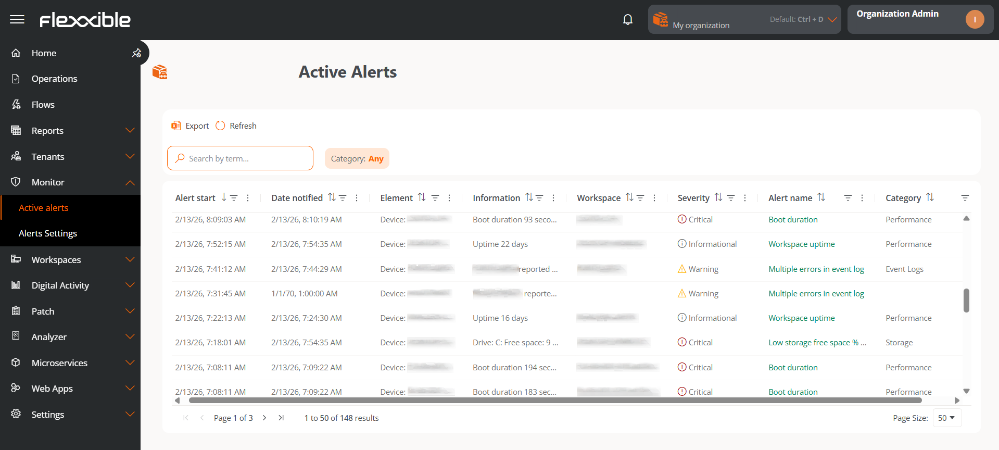
Monitor includes dozens of predefined alerts, each with basic settings, set at standard thresholds. In certain organizations, these thresholds may need specific adjustments to reflect their own conditions. It's recommended to fine-tune settings to minimize noise generated by excessive alerts.
Below are the included alerts and their default settings:
| Name | Severity | Category | Threshold | Threshold unit | Authorized time (minutes) | Enabled |
|---|---|---|---|---|---|---|
| Boot duration | 🔴Critical | Performance | 90 | seconds | 0 | ✅Enabled |
| Login duration | 🔴Critical | Performance | 60 | seconds | 0 | ✅Enabled |
| Critical event log | 🔴Critical | Event Logs | 1 | 60 | ✅Enabled | |
| Workspace with Plug and Play errors | ⚠️Warning | Hardware | 0 | 0 | ✅Enabled | |
| Low storage for Workspace | ⚠️Warning | Storage | 500 | MB | 5 | ✅Enabled |
| High User round-trip time (RTT) | ⚠️Warning | Performance | 350 | milliseconds | 5 | ✅Enabled |
| NTFS error event log | ⚠️Warning | Storage | 0 | 15 | ✅Enabled | |
| Multiple errors in event log | ⚠️Warning | Event Logs | 50 | 60 | ✅Enabled | |
| High RAM usage for Workspace | ⚠️Warning | Performance | 90 | % | 10 | ✅Enabled |
| FlexxAgent not reporting | ⚠️Warning | FlexxAgent | 0 | 120 | ✅Enabled | |
| Workspace pending reboot | ℹ️Informational | Security | 0 | 0 | ✅Enabled | |
| Windows Update service running in non persistent workspaces | ℹ️Informational | Performance | 0 | 0 | ✅Enabled | |
| Low storage free space % for Workspace | 🔴Critical | Storage | 90 | % | 0 | ✅Enabled |
| Low connection signal for Workspace | ⚠️Warning | Connectivity | 40 | % | 10 | ✅Enabled |
| High CPU Usage for Workspace | ⚠️Warning | Performance | 80 | % | 10 | ✅Enabled |
| Workspace uptime | ℹ️Informational | Performance | 15 | days | 0 | ✅Enabled |
| High User input delay | ⚠️Warning | Performance | 350 | milliseconds | 5 | ✅Enabled |
| Machines whose FlexxAgent was automatically repaired | ⚠️Warning | FlexxAgent | 25 | machines | 60 | ❌Disabled |
| Print service error | 🔴Critical | Printing | 720 | 0 | ❌Disabled | |
| Low storage free space % for workspace (warning) | ⚠️Warning | Storage | 70 | % | 0 | ❌Disabled |
These alerts and their default configuration help build the Workspace Reliability Index (WRI), used to determine the device's target performance. This index is combined with user sentiment, collected through surveys, to calculate the User Experience Index (UXI).