UX Panel
UX Panel allows you to graphically view the most relevant data of the environment, from inventory information, usage, locations, monitoring, and much more.
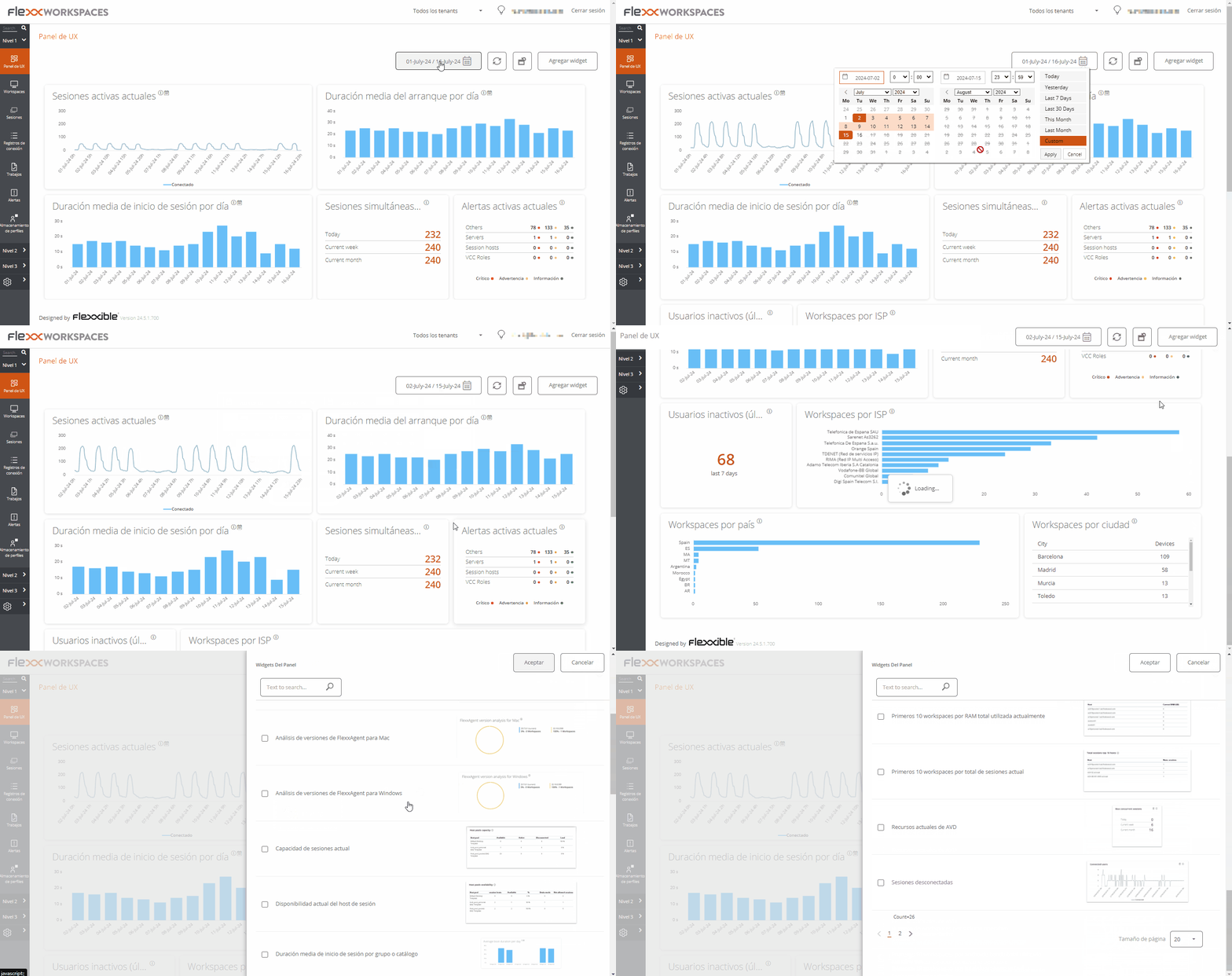
The view is configurable and allows you to segment the data by organization, filter by dates, and select the widgets that will be part of the panel.
The configuration of the widgets included in the panel, as well as their position and size, persists between user sessions, so this configuration only needs to be applied once.
Organization filtering
By default, the organization selector located at the top right of the screen has the 'All tenants' option enabled, allowing the aggregated information of all organizations the user has access to in Workspaces to be viewed. To view the data of only one organization, it must be selected.
The organization selector is only visible when the user has access to more than one organization.
Date filtering
The date selector allows you to apply temporary filters to the panel data:
- Predefined filters:
- Today
- Yesterday
- Last 7 days
- Last 30 days
- This month
- Last month
- Custom filters allow you to select start and end date and time.
Widgets
The different information boxes within the panel are called widgets, which can be repositioned, resized, or directly deleted by clicking the x that appears when hovering the mouse over.
Default widgets
The widgets offered by default in Workspaces are the following:
Current active sessions
Aggregated concurrent active user sessions on the platform over time. This widget displays data filtered according to the date selector.
Average boot duration per day
Organization average boot time (boot) of their devices. This widget displays data filtered according to the date selector.
Average logon duration per day
Organization average login time (login) of their users. This widget displays data filtered according to the date selector.
Maximum concurrent sessions
Maximum number of simultaneous sessions on the platform during the last month, last week, and today (connected and disconnected users). This widget displays data for a specific time period. Not filtered according to the date selector.
Active alerts
Summary of simultaneous active alerts related to different environment elements. Information alerts are shown in green, warnings in yellow, and critical alerts in red. This widget shows real-time data. Not filtered according to the date selector.
Inactive users (last seven days)
Users who have ever connected to a session but did not connect during the previous seven days. This widget displays data for a specific time period. Not filtered according to the date selector.
Workspaces by Internet Service Providers (ISP)
A view of the different Internet service providers in use by the devices. Since these are real-time data, date filtering is omitted.
Workspace by country
A view of the different countries from which the devices connect. Since these are real-time data, date filtering is omitted.
Number of Workspaces per Operating system
This widget shows real-time data. Not filtered according to the date selector.
FlexxAgent version analysis
An analysis of the different versions of FlexxAgent used by the organization and selected operating system, so there is a widget for each supported operating system. This widget shows real-time data. Not filtered according to the date selector.
Top 5 sessions by average duration by user
Top 5 average session duration by user on the platform over time. This widget displays data filtered according to the date selector.
Current sessions capacity
Displays information about the number of sessions that can connect according to the current load in AVD (Azure Virtual Desktop) environments.
- Number of session hosts. Number of session hosts in the host pool.
- Users per host. Number of users that can accept each session host.
- Total sessions. Number of maximum sessions according with the number of session hosts and the configuration of each one.
- Available. Number of new sessions that can connect.
- Active. Current number of active sessions.
- Disconnected. Current number of disconnected sessions.
- Load. Current load percentage of the session host according with the current usage and availability. This widget shows real-time data. Not filtered according to the date selector.
Top 10 workspaces by current total used bandwidth
Top 10 devices with the highest currently used bandwidth in KB/s. This widget shows real-time data. Not filtered according to the date selector.
Current session host availability
Displays information about session host availability by host pool in AVD (Azure Virtual Desktop) environments.
- Session hosts. Number of session hosts.
- Available. How many session hosts are ready to accept new connections.
- %. Percentage of session hosts that are available.
- Sessions not allowed. Number of session hosts that are in drain mode and cannot accept new connections.
This widget shows real-time data. Not filtered according to the date selector.
Top 10 current most loaded pooled session hosts
Top 10 current most loaded pooled session hosts in AVD (Azure Virtual Desktop) environments. This widget shows real-time data. Not filtered according to the date selector.
Average logon duration per pool/catalog
Average logon duration of users in the group (Azure Virtual Desktop) or catalog (Citrix environments). This widget displays data filtered according to the date selector.
Top 10 workspaces by current total sessions
Top 10 devices sorted by the current number of sessions. This widget shows real-time data. Not filtered according to the date selector.
Average logon duration per operating system
Average logon duration per operating system. This widget displays data filtered according to the date selector.
Top 10 recent alerts
Top 10 most recent alerts, sorted by severity. This widget shows real-time data. Not filtered according to the date selector.
Top 10 workspaces by current total RAM used
Top 10 devices sorted by the currently used RAM in GB. This widget shows real-time data. Not filtered according to the date selector.
Current AVD resources
The number of devices, host groups, and application groups created in Azure Virtual Desktop. This widget shows real-time data. Not filtered according to the date selector.
Disconnected Sessions
Aggregated concurrent disconnected user sessions on the platform over time. This widget displays data filtered according to the date selector.
Workspaces per broker
Number of devices per agent, grouping by broker. This widget shows real-time data. Not filtered according to the date selector.
Workspace by city
A view of the different cities from which the devices connect. Since these are real-time data, date filtering is omitted.
Workspaces by wireless connection
A view of the different wireless connections in use by the devices. Since these are real-time data, date filtering is omitted.
Workspace by public ip address
A view of the different public IP addresses in use by the devices. Since these are real-time data, date filtering is omitted.
Workspaces per hypervisor
Number of devices per hypervisor. This widget shows real-time data. Not filtered according to the date selector.
Workspaces by operating system and build number
A ranking of operating system and build number combinations sorted by number of devices using each one. This widget displays data filtered according to the date selector.