Vulnerabilities
Vulnerabilities provides a consolidated view of the exposure status of managed devices. Quickly identify those at risk, the applications with the highest number of vulnerabilities, and trends in the emergence of new security breaches over time.
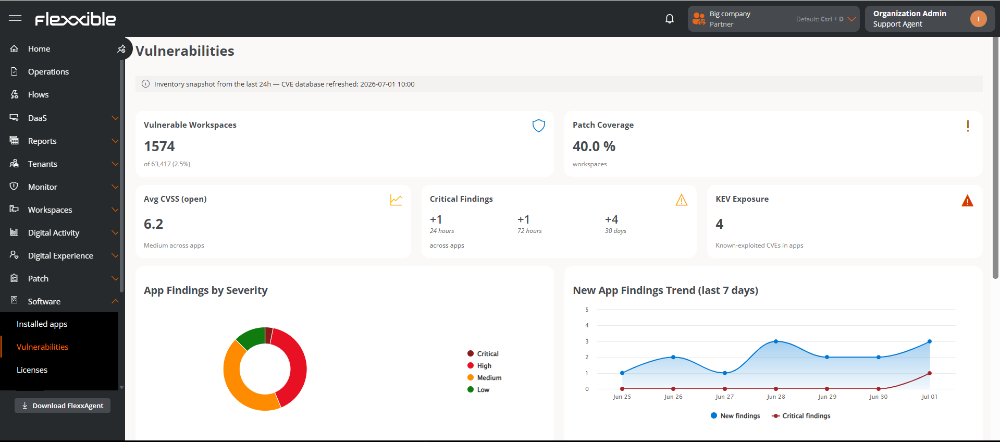
The information displayed corresponds to a snapshot of the inventory processed during the last 24 hours.
Vulnerable Workspaces
Shows the number of devices with at least one open vulnerability, along with the percentage they represent from the total inventoried devices.
This indicator allows evaluating the extent of exposure in the environment, although the real impact also depends on the criticality of the affected devices.
Patch coverage
Indicates the percentage of vulnerable components for which a patch is available and already applied, relative to the total detected vulnerable components.
Average of open CVSS
Shows the average CVSS score (Common Vulnerability Scoring System), on a scale of 0 to 10, of all detected open vulnerabilities.
Although this value provides a reference for the average risk level, it should be interpreted together with the number of critical findings and KEV vulnerabilities.
Critical Findings
Shows the number of open vulnerabilities classified with Critical severity.
The variation indicated over the last 24 hours reflects the number of new critical findings detected during the latest update cycle.

KEV Exposure (Known Exploited Vulnerabilities)
Indicates the number of open vulnerabilities included in the Known Exploited Vulnerabilities (KEV) catalog, which gathers those with evidence of active exploitation.
These vulnerabilities are identified by their corresponding CVE (Common Vulnerabilities and Exposures).
Findings in applications by severity
The chart represents the distribution of open vulnerabilities in applications based on their severity level.
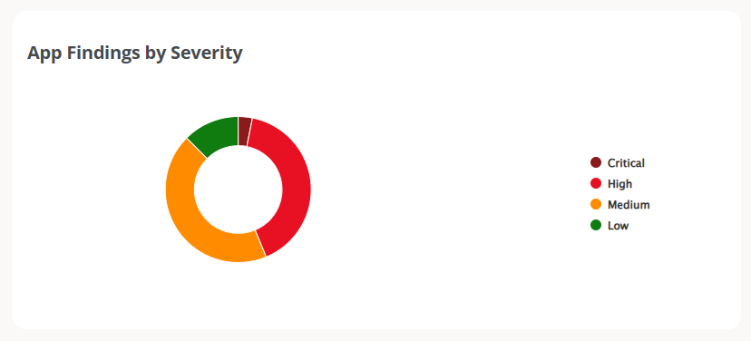
Hovering the cursor over a point on the chart reveals the values related to the selected category.
The legend on the right allows you to highlight a specific severity, dimming the rest of the categories.
Severity Levels
| Severity | Color | CVSS Score | Caption |
|---|---|---|---|
| Critical | Dark Red | 9 – 10 | Vulnerabilities with the highest risk of exploitation and potential impact. Require immediate remediation. |
| High | Red | 7 – 8.9 | High-risk vulnerabilities that should be corrected with priority. |
| Medium | Orange | 4 – 6.9 | Moderate risk vulnerabilities recommended for regular update cycles. |
| Low | Green | 0.1 – 3.9 | Low-risk vulnerabilities that can be addressed during planned maintenance. |
Evolution of new findings in applications (last 7 days)
The chart shows the daily evolution of vulnerabilities detected in applications over the last seven days.
- New Findings (blue). Number of new vulnerabilities detected each day.
- Critical Findings (red). Number of new critical vulnerabilities detected each day.
An increase in new findings may be due to the addition of new devices to the inventory, the execution of new analyses, or the publication of new entries in the vulnerabilities databases.
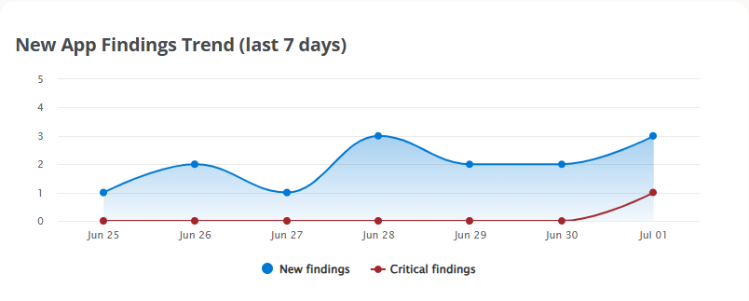
Hovering the cursor over a point on the chart shows the values related to the selected date.
The legend at the bottom allows you to highlight one type of finding, dimming the other.
Top Vulnerable Applications
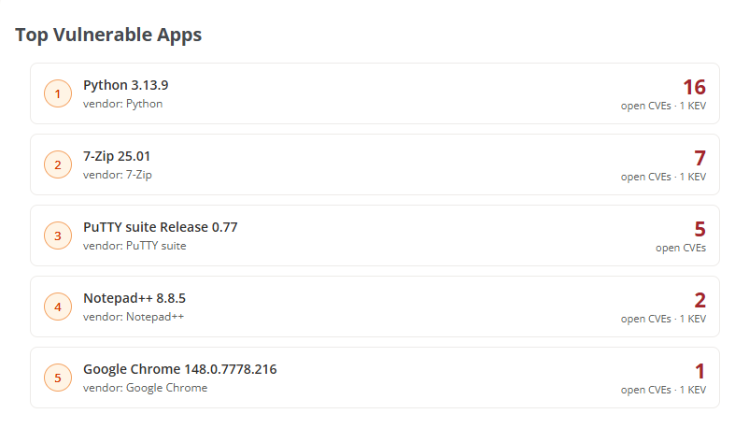
Shows the five installed applications with the highest number of open vulnerabilities.
Each entry includes the application name and version, the manufacturer, the number of open CVEs, and the existence of associated KEV vulnerabilities.
Details of open CVEs in applications
Selecting an application shows the details of its open vulnerabilities.
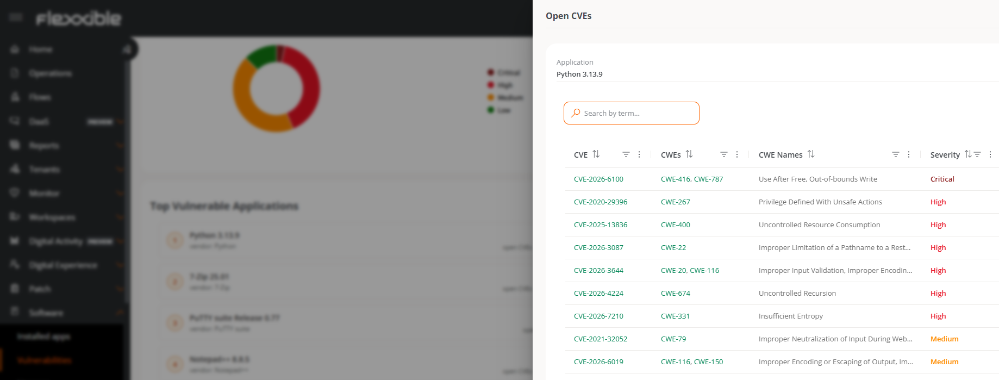
The table includes the following information:
- CVE. Unique identifier of the vulnerability. Clickable. Allows access to the corresponding page for that vulnerability in the official National Vulnerability Database (NVD).
- CWE. Identifier of software weakness.
- CWE Names. Description of the identified weakness.
- Severity. Severity level assigned to the vulnerability.
Top CVEs by CWE (Common Weakness Enumeration) in applications
This panel groups vulnerabilities detected in applications based on the number of software weaknesses (CWE) they are related to.
Each record shows the CVE identifier, the affected application, the associated CWEs, and their severity level.
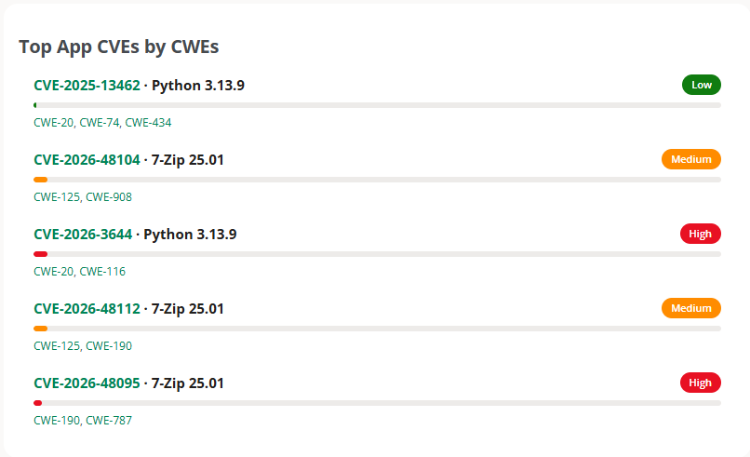
Hovering the cursor over an entry reveals the number of affected devices and the corresponding number of CWE.
Each CVE identifier is a link that allows access to the website of the official National Vulnerability Database (NVD), where detailed information about the vulnerability, its impact, and related references can be found.