Audit
Audit allows the logging of all creation, modification, and deletion actions performed by users on all entities available in Portal, that is, on any element that the user can view or modify within the platform.
This mechanism ensures complete traceability of operations, allowing us to precisely identify who performed an action, when it was executed, and what information was affected. As a result, all interactions carried out in Portal are audited, providing transparency, control, and support for supervision and compliance tasks.
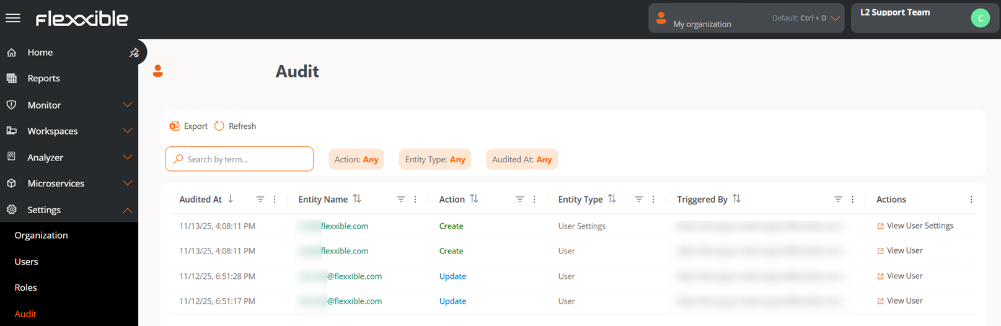
Audit log
Each record in the list shows the following information:
- Audited on. Date and time when the action was executed.
- Entity name. Object on which the action was performed. By clicking, you can access its detail view.
- Action. Type of change registered: Creation, Update, or Deletion.
- Entity type. Classification of the audited object. It can be User, User Configuration, or Tenant.
- Executed by. User who performed the action (name and email are displayed).
- Actions. Depending on the entity type, it allows access to its respective section in Portal; for example, for the entities User and User Settings, the Users section will open.
Audit detail
At the top of the view, summary cards with the main information are shown:
- Audited on. Date and time of the action.
- Action. Type of event executed: Creation, Update, or Deletion.
Overview
- Entity name. Object on which the action was registered.
- Entity type. Classification of the audited object (User, User Configuration, or Tenant). From here, you can access the entity detail.
- Username. User who executed the action.
- Email. User's email address.
- Organization. Organization to which the modified object belongs.
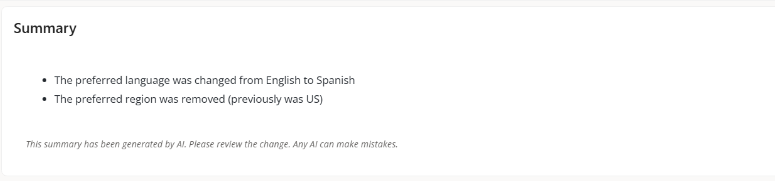
Summary
Displays an AI-generated message briefly describing the recorded action.
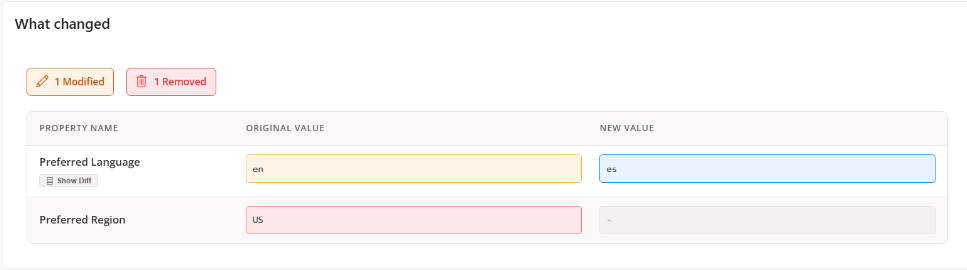
What changed
Shows a table with the changes detected in the audited entity:
- Property name. Attribute that was modified.
- Original value. Value before the modification.
- New value. Updated value after the modification.